Transcription turns speech into written words in the same language. If a recording says “The delivery is on Thursday,” its English transcript contains those words. Translation changes the language: “La entrega es el jueves” is a Spanish translation, not an English transcript.
For a video, the useful result may be a readable document, captions with timestamps, or both. Choose that result before starting. A page of accurate text does not automatically contain subtitle timing, and a fluent translation does not prove that the original speech was recognized correctly.
One recording, three different outputs
Imagine a short work update: “Um, the delivery is on Thursday, not Tuesday. Please ask Maya to confirm the address.” You can turn it into several different documents depending on the task.
| Output | Example | What it is useful for |
|---|---|---|
| Verbatim transcript | “Um, the delivery is on Thursday, not Tuesday. Please ask Maya to confirm the address.” | Preserving the actual wording, including the hesitation |
| Cleaned transcript | “The delivery is on Thursday, not Tuesday. Please ask Maya to confirm the address.” | Reading the same meaning without a filler word |
| Action note | “Maya: confirm the address. Delivery: Thursday.” | A working note derived from the speech, not a word-for-word record |
| Translation | “La entrega es el jueves, no el martes. Pídele a Maya que confirme la dirección.” | Making the message readable in Spanish |
These are authored examples. The differences matter: if someone asked for the exact statement, a concise action note is not a substitute. If you only need to remember the next step, a full verbatim transcript may be unnecessarily hard to scan.
Manual transcription or an automatic first draft?
Manual transcription means listening and typing, usually with repeated playback. You control the wording and can flag unclear speech as you go. It is a reasonable route for a short recording, a specialized passage or material that must follow strict editorial conventions.
Automatic transcription uses speech recognition to propose the words. That moves much of the work from typing into review. Clear speech can produce a useful starting point; background noise, interruptions and unfamiliar names can produce a readable-looking draft with important mistakes.
Neither approach removes the need to decide how to represent uncertain speech. A human can mishear a name, and an automatic system can supply a plausible word that was not said. If the distinction matters, return to the audio and mark uncertainty rather than silently making the sentence more convincing.
A practical hybrid is to generate a draft, listen through while correcting it, and then format it for its destination. Do not compare only how quickly the first text appears. Compare the effort required to reach a version you can actually use.
Why accents, noise and context affect the result
Speech recognition has to separate speech from other sounds and map the sounds to words. Overlapping speakers, music and a distant microphone make that job harder. A familiar sentence spoken clearly is different from an abbreviation, surname or product identifier the system has little context for.
An accent does not make a speaker “incorrect.” It means the recognition system must handle that speaker's pronunciation. Avoid promising one accuracy percentage for every accent, language and recording condition. Check a representative passage from the actual material instead.
Before reprocessing a whole recording, ask what went wrong. If the wrong source language was selected, correct it. If the speaker is faint under music, repeated translation cannot restore words that were never recognized clearly. If a company name is consistently misspelled, correct the draft and check other occurrences.
A review method that catches meaningful errors
Read the draft once for structure, then listen with a narrower checklist. Numbers, dates, names, negatives and conditions deserve attention because a single error can change the action someone takes.
| Draft says | Recording says | Why the correction matters |
|---|---|---|
| Delivery is on Tuesday | Delivery is on Thursday, not Tuesday | The date and the correction were lost |
| Ask me to confirm | Ask Maya to confirm | The task was assigned to the wrong person |
| We will ship today | We can ship today | A possibility became a commitment |
| Pay fifty | Pay fifteen | The amount changed |
This table is a review exercise, not a benchmark of any app. Use it to build your own check from the details in your recording. A transcript can read smoothly and still fail every practical requirement of the conversation.
For unclear words, replay enough surrounding audio to recover context. If you still cannot tell, keep an uncertainty marker in your working draft and ask the speaker where possible. Replacing an uncertain phrase with a confident guess can be worse than leaving a small gap visible.
Turn a video into text you can use
Start with the final video edit and decide whether you need timed captions or a reading copy. Keep a reference to the source file so later corrections can be checked against the same recording.
- Choose the spoken language. Use the language of the audio, not the interface or the filename. For a mixed-language passage, inspect the result rather than assuming perfect automatic switching.
- Generate or write the original-language text. If your tool also translates, keep the original available so you can distinguish recognition errors from translation errors.
- Review with playback. Correct the important details and unclear boundaries. Do not remove a word simply because it makes the sentence less tidy if the job requires a faithful transcript.
- Prepare the intended output. A reading document needs paragraphs. Subtitles need timing and readable line lengths. Notes need an explicit distinction between what was said and your own summary.
- Check the final file. Open it in the receiving editor, player or document app. Confirm encoding, language, line breaks and any timestamps you promised to deliver.
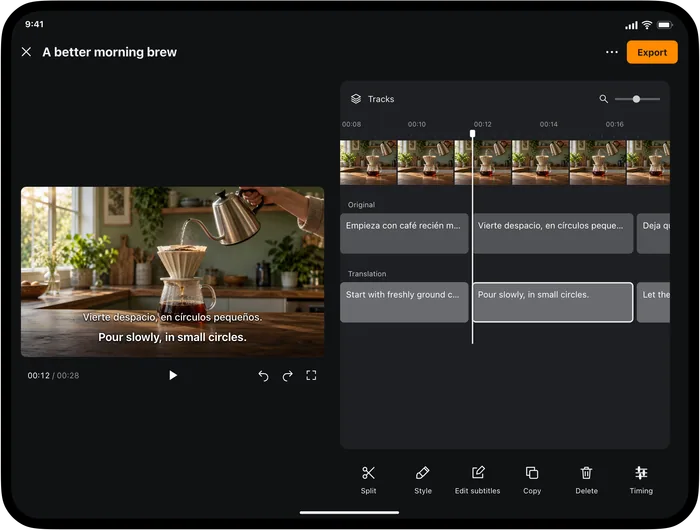
Video Translator by Transly's subtitle-project workflow is useful when the source is a local video and the output needs timed text. You can review the original, translation and caption timing, then export subtitle files. Use a tool with the required document export when a client needs a formatted reading copy instead of captions.
Times are in seconds.
Pour slowly, in small circles.
The timing illustration explains how text is attached to a section of video. For the complete mobile workflow, follow how to add subtitles to a video.
Plain text, SRT and WebVTT are different deliverables
A plain text document is easy to search, quote and edit. It may include occasional timestamps for reference, but it does not need a time range for every sentence. It is useful as a reading copy or as material you will turn into notes.
SRT contains subtitle text and the times when each cue should appear and disappear. It is suitable for compatible video players and editors. WebVTT is a web text-track format used with supported video players. Neither format is a new recording of the speaker, and neither guarantees that every visual style from an editor will be preserved elsewhere.
Text becomes part of the picture.
A compatible player can hide the text.
For meeting notes, separate the transcript from decisions and action items. A transcript records speech; a useful note may organize that speech under owners and dates. If you write a summary yourself, keep enough reference to check a disputed detail. Do not label a paraphrased summary as an exact quotation.
When you also need translation
Recognition and translation are separate stages even when an app presents them together. If the original transcript says the wrong day, the translation may faithfully translate that wrong day. Review the original where you can, especially for a line whose meaning changes what you will do next.
Transly's live translation is useful when you want written original speech and a translation during a conversation or playback. It helps you follow the session without waiting to prepare a polished transcript. For publication, return to a review workflow before treating the text as finished copy.
If you are preparing a reply rather than documenting a recording, the English-to-Spanish voice guide shows how to turn an English thought into a Spanish message. That is a different job from transcribing someone else's words, even though both may begin with spoken input.
A final pass before sharing
Decide whether the recipient expects exact speech, cleaned wording, a translation or notes. Label the file accordingly. Check that the content belongs to the correct recording, that names and dates were reviewed, and that your own comments cannot be mistaken for the speaker's words.
For a translated transcript, include the original when it will help someone verify a point. For subtitles, test the text with the matching video. The best format is the one that lets the next person use the result without reconstructing what you meant to deliver.
Transcription questions
What is the difference between transcription and translation?
Transcription writes down speech in the same language. Translation changes the language. A workflow can do both, but an accurate translation depends on the original speech being recognized correctly.
Is an automatic transcript ready to publish?
Treat it as a draft until you have checked it against the recording. Review names, numbers, dates, negatives and unclear passages. Noise, overlapping voices, accents and specialist vocabulary can all affect the result.
Can I use subtitles as a transcript?
Subtitle text can be useful source material, but its short cues and timestamps are designed for playback. A readable transcript may need paragraphs and speaker context. Keep the source video available while reorganizing the text so you do not change the meaning.
Which file should I use for video captions?
Use a format supported by the destination. SRT is a common subtitle exchange file; WebVTT is used for web text tracks. Both contain text and timing. A plain text document alone does not provide a timed subtitle track.
Should I remove filler words from a transcript?
Keep them when the task requires the exact wording. For a cleaned reading copy, you can remove hesitations that add no meaning, but preserve qualifications, corrections and uncertainty. Agree on the style before editing, and keep access to the recording.