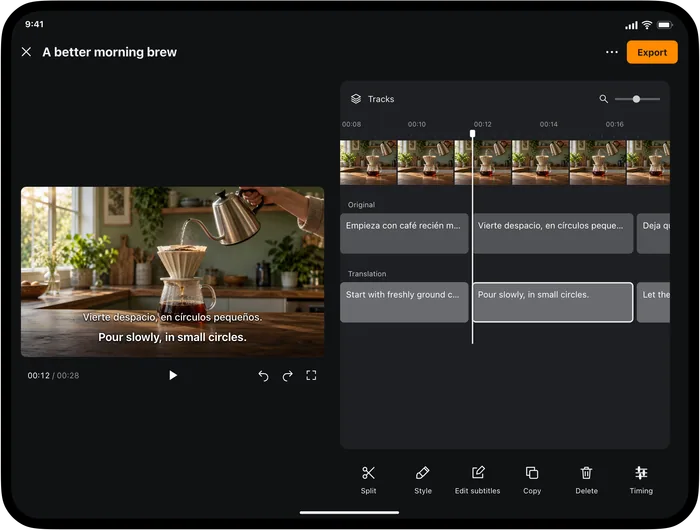
You have recorded a product demonstration in Indonesian. Your next audience needs English. Start with the original video and make English subtitles you can review before sharing; there is no need to rerecord your voice just to make the explanation understandable.
Give your Indonesian video an English track
In Video Translator by Transly on iPhone or iPad, import the local video and choose Indonesian → English. For a file you intend to publish, use the subtitle-project workflow, let the full project finish, then review the original and translated text with the video.
Watching mode can show captions while a video plays. It is useful for checking a passage quickly, but it does not replace the review of a complete subtitle project before export.
The second sentence only makes sense with the demonstration: “this part” points to an object. If you cut away from the object too early, the English subtitle becomes harder to follow. Check the translated track while watching the final cut, not just in a text list.
Review what conversational Indonesian leaves unstated
Indonesian speech often relies on context. Do not add an English subject, a time or a promise just because the translated sentence sounds smoother that way. Listen again when it matters who did something or whether an action has already happened.
| Detail in the recording | What to check in English |
|---|---|
| sudah / belum | Whether the action is already complete or has not happened yet |
| bisa | Whether the speaker means ability, permission or a possibility |
| ini / itu | Which object is visible or was mentioned earlier |
| Product names and amounts | Exact spelling, quantity and units |
Informal nggak may mean “not,” but a damaged recording can lose that short word. Check the source transcript first. Editing a polished English sentence will not fix an omitted negation unless you also listen to the original.
Export for the place you will publish
After checking the wording and timing, export the English track as SRT or WebVTT, or use the supported video output workflow. Keep the subtitle file with the exact cut it was made for. If you trim the beginning of the video later, check synchronization again.
An English SRT contains text and timing; it does not change the recorded Indonesian voice. When you want viewers to compare both languages, review a bilingual layout for readability on a phone. The SRT export guide walks through choosing a track and saving it.
Check a presentation before you deliver it
For a short rehearsal, select Indonesian → English in Transly's live microphone translation. Speak one point at a time, read the English, and check whether it preserves the action you want the audience to take. Keep slide numbers, dates and product names visible in your notes.
Datanya belum lengkap. Saya akan kirim versi terbaru besok pagi.
The data is not complete yet. I'll send the latest version tomorrow morning.
Written example. 'Belum' means the work is not complete yet; the sentence does not say that it will never be completed.
This is a way to prepare your wording, not a promise that Transly will inject an English voice into a meeting. If your audience needs live meeting captions, check the meeting service's caption controls. For someone speaking near your phone, the live translation page explains the microphone route.
A voice message is a different input
If a messaging app can play the Indonesian message, start Transly's cross-app audio translation on iPhone, choose Indonesian → English, complete the broadcast prompt, then play the message. Review the English before forwarding or summarizing it. No automatic reading of your message history is required.
A standalone audio attachment is not automatically a supported video-project import. Use a compatible player for playback; do not rename an audio file to pretend it is a video. A live call also has different audio-access rules from a playing message.
Questions before sharing
How do I translate Indonesian voice to English?
Use Transly's microphone mode for nearby speech, cross-app translation on iPhone for capturable playback, or Video Translator by Transly for a local video subtitle project. Select Indonesian as the source and English as the target.
Can I add English subtitles without changing my Indonesian voice?
Yes. Create a subtitle project, review the English track, and export subtitles or the supported video output. A translated subtitle track leaves the original spoken recording separate; it is not an English dub.
Can I use it for a live work call?
Do not assume call audio is capturable just because video playback works. Use the meeting app's documented captions, or the live microphone workflow for nearby speech. This page does not promise a call integration.
Can I translate an Indonesian voice message?
You can translate a playing message when its app makes the audio available to cross-app capture. Start the translation and play the message; check the original text if the English loses a name or a negative word.
Is it free?
The apps are free to download with in-app purchases. Current plans and available usage are shown in the relevant app. Transly and Video Translator are separate products; do not assume a purchase or allowance is shared.
For the reverse direction, see English → Indonesian. Other examples: English → Spanish and Hindi → English. Already using Transly's local player? Its short video tutorial is available separately.