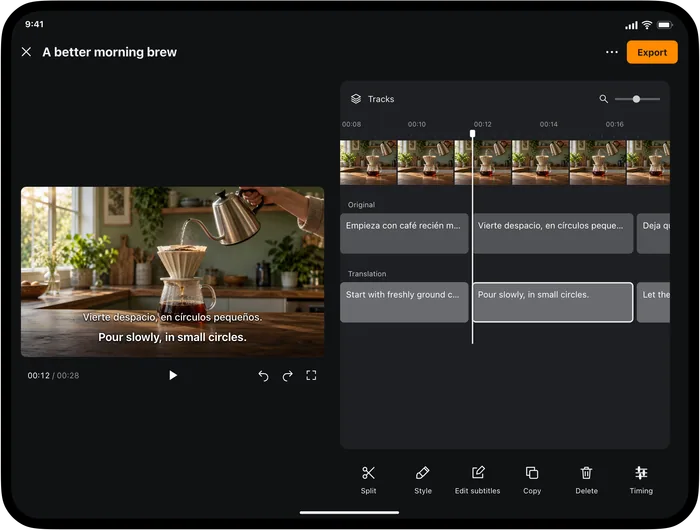
An English subtitle track lets an audience abroad follow the Portuguese recording you already made. Keep your original delivery, then review the translation for the people who will watch it. Video Translator by Transly handles local-video subtitle projects; Transly is useful when you need to understand or rehearse a short spoken passage.
Decide what you need to hand over
| Your task | Useful output | Where to begin |
|---|---|---|
| Publish a Portuguese video for English readers | A reviewed English subtitle file or captioned video | Video Translator's subtitle project |
| Rehearse an explanation for a class | English text you can check against your intended point | Transly live microphone translation |
| Understand a received voice update | The English meaning of the played message | Transly cross-app audio translation on iPhone |
These outputs are not interchangeable. A line visible during playback is helpful for understanding a moment; a publishable track needs the whole recording checked.
Make a subtitle project from the finished cut
Import your local video in Video Translator, choose Portuguese as the spoken source and English as the target, then generate the subtitle project. If a regional source option is available for your recording, choose Brazilian Portuguese. Start from the video cut you intend to publish so that later edits do not immediately invalidate the timings.
Review a few lines with the original audio before making stylistic edits. Confirm that the Portuguese transcript is right first, especially when the recording contains names, slang or a correction made aloud.
In this example, the picture shows a pourable mixture, so “batter” fits. In a bread-making video, massa may need “dough.” Watch the action while editing rather than replacing every occurrence of a word with the same English equivalent.
Keep the speaker's point, not every filler
Brazilian speech may include né, tipo or an unfinished start before the speaker gets to the instruction. A readable subtitle can be concise, but it must retain uncertainty, emphasis and corrections that matter to the meaning.
For example, pode levar mais tempo means that something may take longer. Turning it into “it will take longer” adds certainty. Likewise, check whether a gente refers to the speaker's team, the audience doing an activity, or people generally before choosing “we” or “you.”
Check names, measurements and labels against the actual product or slide. Then watch the English track on a phone-sized screen: can someone read it before the next action? Adjust text and cue timing where necessary, without hiding a missing part of the explanation.
Deliver the file the viewer or editor needs
Export the English track as SRT or WebVTT for a platform that accepts a subtitle file. For a video that should show captions without a viewer selecting a track, see the captioned-video output guide. Keep a copy of the original recording and the reviewed project.
Neither an SRT nor a burned-in subtitle generates an English voice. If someone asks for an English dub, clarify that requirement before delivering subtitles as if they were the same thing.
A short update before class or work
Use Transly's live microphone mode with Portuguese → English to check an explanation you are preparing. Speak a complete thought, then read the English and verify the commitment, date and recipient.
A entrega ficou para sexta-feira. Você pode confirmar o endereço?
The delivery has been moved to Friday. Could you confirm the address?
Written example. The delivery date changed; the request is to confirm the address, not to approve a new order.
A received voice message can be played while iPhone cross-app translation is active, if the source app allows its playback audio to be captured. A live work call is a different input; use the meeting service's documented captions or another confirmed route instead of assuming a call integration.
Portuguese-to-English questions
How do I translate Portuguese voice to English?
Select Portuguese as the spoken source and English as the target. Use Transly for nearby speech or capturable app playback, and Video Translator by Transly when you need a reviewed subtitle project for a local video.
Can I keep my Portuguese voice and add English subtitles?
Yes. Review the English subtitle track and export the required subtitle or video output. The subtitle workflow does not replace the original recording with an English voice.
Can it translate a Portuguese audio file or voice message?
For a message, play it in an app that makes its audio available to cross-app capture. This page does not promise arbitrary audio-file import into a video project. Choose the documented input rather than changing a file extension.
Can I use it during a live business call?
Call audio has different access rules from nearby speech or video playback. These instructions do not establish compatibility with every phone or meeting app. Check the meeting service's own captions for a live call.
Is it free to add English subtitles?
The apps are free to download with in-app purchases. The relevant app shows current project, usage and subscription conditions before you choose a plan; no fixed free allowance is promised here.
For English recordings you want to understand in Portuguese, use English → Portuguese. See also Spanish → English, live translation, and Transly's local-video tutorial.